Using Custom and Lookalike Audiences to Sell More Books
After you've mastered the basics and started scaling your ads, one of the first advanced tools you should progress into is Audiences. For website sales, you'll also want to set up the Facebook Pixel for retargeting.
Audiences allow you to show ads to people who are already in your marketing funnel.
This is called retargeting. You can both show existing ads to these audiences OR you can create ads specifically designed for retargeting.
Retargeting is great because people who have already seen or interacted with your brand and shown interest are a much more targeted audience that is more likely to buy.
Sourcing Your Audience
To start a retargeting campaign, you have to have a list of users who are part of your marketing funnel. There are many ways to source this:
Use the Facebook Pixel
Most of my explanations around the Facebook Pixel have been targeted towards authors who are selling their books on their website and will be using "Sales" rather than "Traffic" campaign types in Facebook ads.
But the pixel can be useful even if you are not doing that. Adding a Facebook pixel to your website allows you to start building a list of people who have interacted with your website. You don't get to see this list, but Facebook will store it to memory and keep track of those people inside of the Facebook ecosystem.
You can also control what counts as an interaction.
You can build a list of all visitors to your website. This is a perfectly fine place to start; these people are quite interested in your books!
But you can get more defined.
With the Facebook Pixel installed you can create audiences of people who have clicked on a specific button or visited a certain page of your website.
You actually don't have to have a website to use the Facebook Pixel.
Linktree allows you to add your pixel to your page. This enables you to retarget any users who visited your Linktree from social media.
This is a pretty decent audience to decide to retarget.
People who have engaged with your ad
You can build an audience directly in the Facebook ad platform by selecting various options around users who have interacted with your ads.
You can choose those who have only seen your ad or those who have clicked on it.
Your Email List
You can also upload lists of emails from outside of the Facebook ecosystem.
Authors spend a lot of time building up their email lists to be able to reach users outside of social media, and this is just another beneficial reason to have a big email list.
Types of Audiences
Now that you have an audience, there are two things you can do with them.
Custom Audience
With a custom audience, you send your ads to the exact people in your audience. Those in your email list or who have seen your ad.
This is the retargeting option I have been discussing.
This is great for:
New Releases
For people on your email list, or those who have visited the page of an un-released book on your website, it might be safe to assume they have already bought your books, are big fans, and would love to be informed of updates on your new release.
Retargeting is a GREAT way to notify these people of your new book. Yes, sending your email list an update is helpful. But making sure everyone has 2-3 reminders will greatly increase your conversion rate.
Closing Sales
Remember that GOOD performance means that 95% of people who visit your Amazon page do not buy.
But these are people who took the time to stop scrolling, read your ad, click on the link and visit your Amazon book page.
It's safe to assume a huge percentage of these people (perhaps 50%?) are close to buying your book. They are on the fence. Maybe they weren't sure it was a perfect fit. Maybe you caught them when they had just started another book and didn't want to buy a new one. If you can show another ad to these people both A) reminding them of your book and B) providing more intrigue and reasons to start it, you can close the people that are close.
Look-alike Audience
While retargeting is effective, you don't have to be limited to those already in your funnel.
You can use your existing audiences to inform Facebook on how to find NEW customers.
With a look-alike audience, Facebook will look at the profiles of the people on your existing list and create a new audience based on similar people.
It is a GREAT way to reach new customers that are highly likely to convert.
You can choose how closely the audience matches. The more perfect you ask Facebook to match them, the smaller your reach will be.
How to use Audiences in Facebook
To create an audience:
- Navigate to the Audiences tab from the left sidebar in Facebook Ad Manager
- Press the Create audience button and select either Lookalike audience or Custom audience
The creation process will differ for each option from here.
Custom Audiences
First you must select the source for your custom audience:
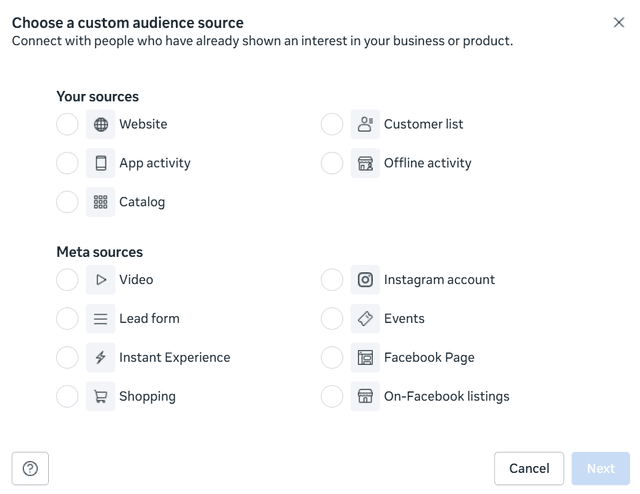
The most relevant to authors will be:
- Website - visits to your website (or Linktree) collected from the Meta Pixel
- Customer List - your email list
- Video, Facebook, Instagram - these source from various types of interactions or follows on social media
Then you will narrow down your audience.
Each option will have you select a source, events, then name and describe your audience with advanced options like combining and excluding people.
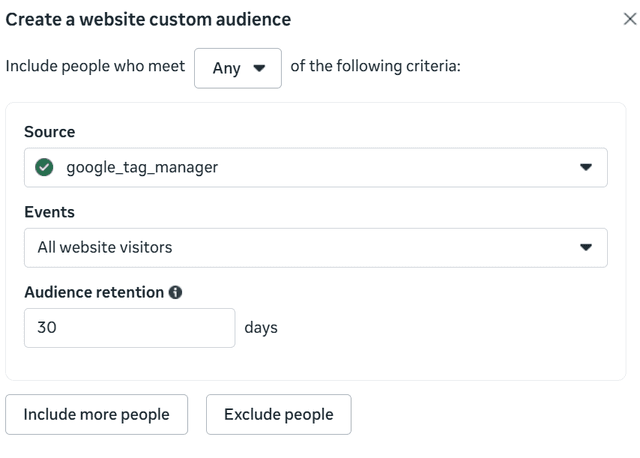
However the options for each source type will be slightly different. The event you choose for a website pixel and an Instagram interaction are, of course, unique.
You will have to read through and tailor these to your need.
What you should keep in mind is that:
More specific = higher converting
BUT ALSO
More specific = higher CPM
You pay a higher CPM because when you have a smaller audience, you don't have as many options of people to bid on. When your audience members come up in the ad auction, they are rarer, so you will have to bid more to get your ad shown.
Being more or less specific isn't necessarily better or worse, you will use them in different scenarios.
Audience Retention
Audience retention is a way of narrowing or expanding relevance again. The longer of a look back you use, the bigger your audience will be but it might not convert as well on people who saw your account 365 days ago vs within the last 30 days.
Lookalike
Lookalike audiences are often built on top of custom audiences.
You take the custom audience you've made (as described above) and ask Facebook to find similar people.
You can make a new audience from the lookalike form, but I recommend building it as a custom audience first and then using that as a source. This way you can re-use the custom audience in multiple places in the future if needed.
Beyond the source there are two options to choose:
Geography
Simple enough, just choose if you'd like to place any geography restrictions. This will be overridden if you restrict geography in your adset where you select the audience for targeting later.
Audience Size
The audience size is where you select how closely you want your audience to mirror the source.
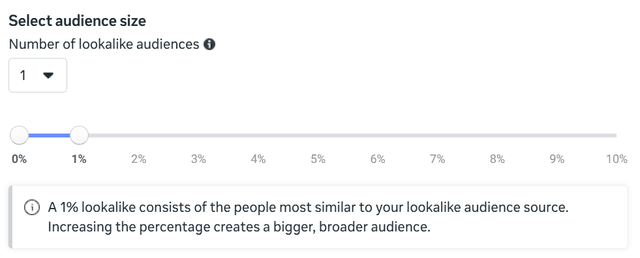
The lower the number, 1% being the most strict, the more perfect of a match you will get to your original source.
However, this will limit the size of the audience you are targeting.
You do have the option of creating multiple lookalikes off of the source, so you could do a 1% and a 7% and see how each perform.
I recommend starting at the lower end, 3%, and seeing how you perform.
If it's a high ROAS you can scale up the audience by raising the threshold later.
If the ROAS is low, it doesn't matter much if you have more reach.
Adding Audiences to Your Campaigns
When building an adset you can add your custom or lookalike audiences.
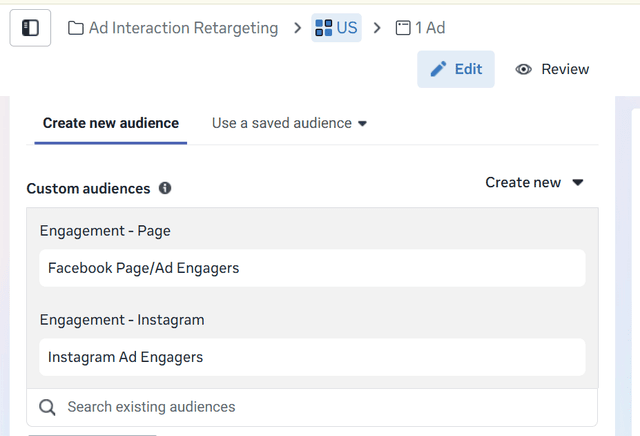
You can add them in both Advantage+ and manual campaigns.
As a reminder in Advantage+ they are more of a "suggestion" to Facebook. They will show your ads to this group but also to people beyond that they think will have high engagement based on your custom audiences interaction with it.
In a manual campaign you have more control and can target just your created audience.
Because of that, when I run retargeting campaigns I'm creating a separate manual campaign that focuses just on retargeting.